Design emails like they’re built: Applying MJML principles in Figma
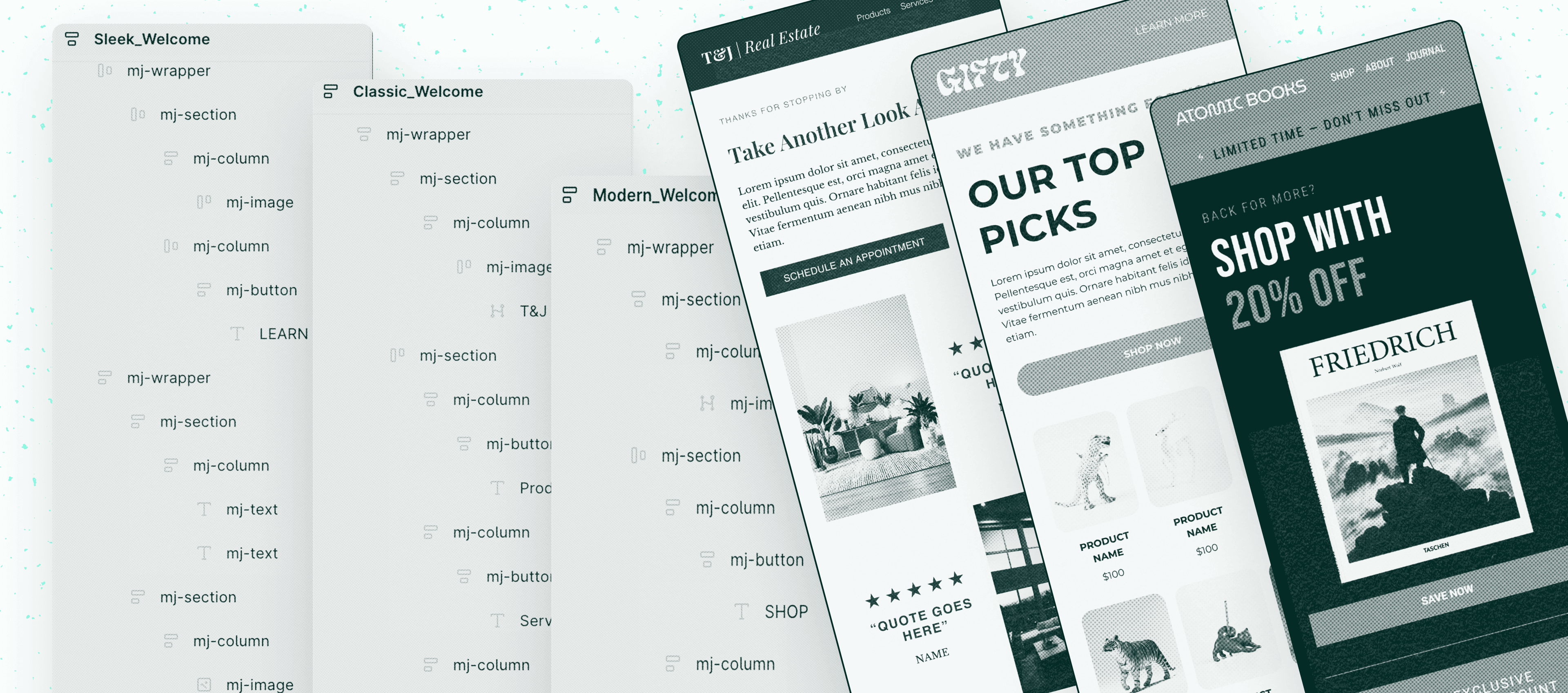
Designing emails in Figma goes far beyond visual creativity. In lifecycle marketing teams, a design file is not the final output. It is the starting point for production, development, QA, and deployment. Small organizational decisions, like how layers are named, can directly impact how fast an email reaches the inbox.
Like any professional design software, Figma requires structure, consistency, and intention to produce files that can be efficiently shared and implemented. One of the most overlooked but impactful practices is layer naming.
For lifecycle and email design teams, properly named layers are not just a design preference. They are a collaboration tool that helps email developers, marketers, and designers work faster, reduce errors, and maintain consistency across campaigns.
Why layer naming matters in email design
Email production is inherently collaborative. A single campaign often moves through designers, email developers, QA specialists, and marketers before reaching the inbox. When layers are poorly named or left as default values like Rectangle 24 or Frame 103, friction appears immediately.
Whether you are building a design system, a UI kit, an email template, or even an ad variation, intentional layer naming creates shared understanding across teams.
Clear naming helps teams:
Reduce implementation errors during development
Speed up handoff between designers and email developers
Maintain consistency across reusable components
Improve template scalability
Enable faster QA and iteration cycles
Clean files lead to predictable production.
Speed often wins over structure
Most designers have experienced it. Deadlines approach, ideas flow quickly, and the focus shifts toward visual execution. Layer organization becomes secondary, and naming conventions are forgotten.
While this is understandable, the downstream impact is significant. Developers spend extra time interpreting layouts, marketers struggle to reuse components, and small inconsistencies accumulate across campaigns.
The impact becomes clear when looking at feedback from developers themselves. Across design and development communities, similar frustrations appear repeatedly:
“Frame 10394” syndrome: Files with generic names like “Frame 10394,” “Vector 34,” or “Group 2,” making it difficult to understand the element's purpose.
Unusable structure: Lack of consistent auto layout, nested hierarchy, and component naming makes exporting assets or mapping designs to code difficult.
Increased rework: Poor organization forces developers to manually adjust CSS or guess behavior, leading to inconsistencies between design and production.
Designing emails means designing within constraints
Email design differs from traditional UI design because it operates within strict technical limitations. Responsive behavior, table-based layouts, and email client compatibility all influence how designs are translated into code.
Understanding these constraints early helps designers create layouts that are easier to build and maintain. This is where understanding how emails are actually coded becomes valuable.
In our related articles, we explore additional practices for mastering email creation within these limitations.
Why MJML matters for designers
MJML stands for Mailjet Markup Language, a framework widely used to code responsive emails. It simplifies complex HTML email structures into reusable components that automatically adapt across devices.
While designers may not always write MJML themselves, understanding its structure dramatically improves collaboration with email developers.
So how does MJML relate to designing emails in Figma?
Using MJML syntax as a layer naming system
Even if you use tools like Cannoli to convert Figma designs into HTML or MJML, applying MJML-inspired naming directly inside Figma can transform your workflow.
Instead of naming layers visually, you begin naming them structurally.
For example:
mj-wrapper
mj-section
mj-column
mj-text
mj-image
mj-button
This approach mirrors how emails are actually built in code.
When developers receive the file, the hierarchy already reflects the final implementation logic. The design becomes a production blueprint rather than just a visual reference.
Auto layout + MJML thinking = production-ready structure
Figma’s auto layout feature closely simulates how responsive email components behave. When auto layout is combined with MJML-style naming, designers effectively recreate the logic of coded emails inside the design environment.
In practice, this means:
Sections behave like responsive containers
Columns stack naturally at smaller breakpoints
Spacing remains consistent across devices
Developers can interpret intent instantly
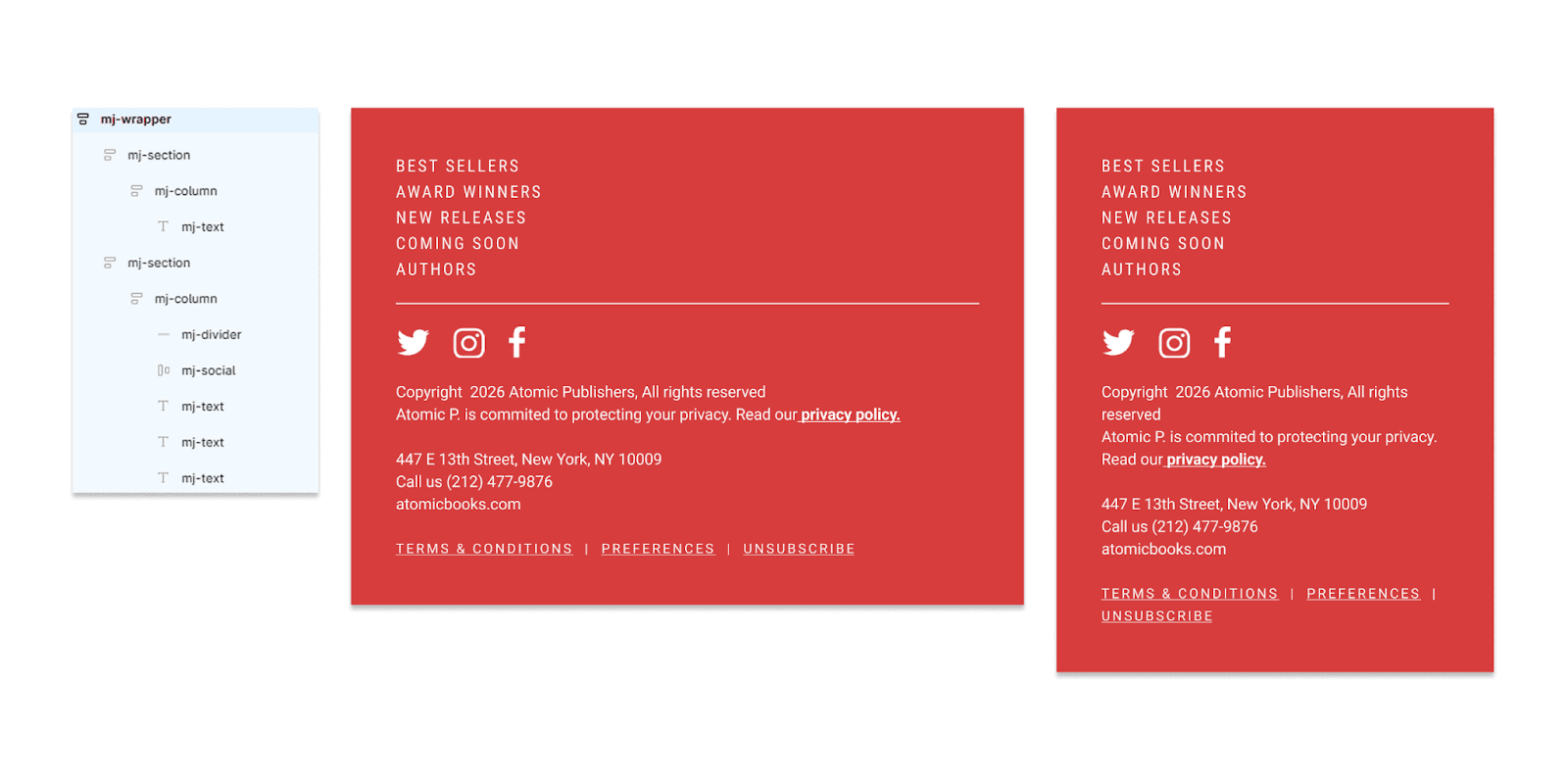
In the example shown, the layer panel represents the structural hierarchy while the canvas displays the first footer section. Two breakpoints, 600px and 290px, demonstrate how the layout adapts similarly to a responsive MJML email build.
Instead of redesigning responsiveness later, it is built into the design from the start.
Benefits for lifecycle teams
Adopting intentional layer naming is not just a designer improvement. It benefits the entire lifecycle organization.
The operational impact becomes clear when viewed across the full lifecycle workflow:
Benefit | Impact on lifecycle teams |
Faster developer handoff | Developers spend less time decoding layouts and more time building. |
Fewer production errors | Clear hierarchy reduces spacing, alignment, and responsiveness mistakes. |
Reusable templates become easier to maintain across campaigns and regions. | |
Teams can quickly identify components during testing and revisions. | |
Stronger cross-functional collaboration | Design, marketing, and development teams share the same structural language. |
From design file to inbox-ready email
By aligning Figma organization with MJML logic, designers create files that translate smoothly into production. The result is faster launches, fewer revisions, and more consistent customer experiences across lifecycle journeys.
Intentional layer naming may seem like a small habit, but in high-volume lifecycle marketing programs, small operational improvements compound quickly. Cleaner files reduce production friction, improve collaboration between designers and developers, and ultimately help teams launch faster without sacrificing quality.
When design structure mirrors production logic, the path from Figma to inbox becomes predictable and scalable.