The Bloomreach Engagement implementation playbook: Part 2

Part 2: Events, attributes, and the merging logic
Bloomreach is fundamentally an event-based platform. Every customer action, every system signal, every marketing interaction is an event. The quality of your implementation (and of every downstream scenario, segment, and dashboard) depends on the quality of your event design. This part covers how to design a tracking plan that scales, how to handle attributes and customer properties, how to manage historical imports, and how identity stitching actually works under the hood.
The tracking plan as the foundation
The tracking plan is the single most important artifact in a Bloomreach implementation. It defines every event, attribute, and customer property before any of it is coded. Without one, engineering and marketing will disagree about what product_viewed means within a month of launch.
A tracking plan at minimum includes:
Event name. Use snake_case and verbs in the past tense:
product_viewed,cart_updated, checkout_completed. Avoid ambiguous names like click or action.Event description. One sentence explaining when the event fires and what it means.
Trigger location. The page, component, or backend service that fires the event.
Attributes. The properties attached to the event, each with a type, description, and example value.
Required vs. optional. Which attributes must be present for the event to be valid.
Business owner. Who is authorized to change or retire this event.
Most implementations have 30–80 events. Under 30 and you’re almost certainly under-instrumenting. Over 80 and you’re likely building events that nobody will ever query.
💡Scalero’s naming convention:
Events: snake_case, past tense verbs. Examples:
email_opened,subscription_cancelled.Event attributes: snake_case, descriptive nouns. Examples:
product_id,order_total.Customer attributes: snake_case with prefix by source. Examples:
crm_loyalty_tier,web_last_visit.
Consistency matters more than the specific convention. Pick one and enforce it ruthlessly.
Anatomy of a well-designed event
Consider a purchase event. The naive implementation tracks a total:
The items array is the critical piece. It’s what lets Bloomreach power product recommendations, category-level segmentation, and catalog-driven personalization in downstream emails. Without it, you’re flying half-blind.
Attribute types. Bloomreach supports strings, numbers, booleans, arrays, and JSON objects. Pick types deliberately, once an attribute exists as a string, reporting on it numerically requires cleanup. A few rules:
Monetary values are always numbers, never strings. Store in a consistent currency and include a currency attribute separately.
Timestamps are ISO 8601 strings (2026-04-21T14:30:00Z). Bloomreach handles them natively.
Boolean attributes should be actual booleans, not strings like "yes" / "no".
Arrays of objects (like items) are supported and should be used whenever you’d otherwise be tempted to flatten into
item_1_name,item_2_name, etc.
Customer attributes vs. event attributes
Event attributes describe an action. Customer attributes describe a person. The two are easy to confuse during implementation.
Event attribute example: product_id on a product_viewed event describes what was viewed in this session.
Customer attribute example: loyalty_tier on the customer profile describes a stable (or slowly changing) property of the person.
Customer attributes come from three sources:
Imports. Uploaded via CSV or pushed via the REST API from your CRM, data warehouse, or loyalty platform. These are the attributes Bloomreach doesn’t compute itself, things like
customer_since,subscription_plan,preferred_store.Computed from events. Bloomreach can compute customer attributes from event history, for example, total_lifetime_spend summed from all purchase events.
Predictive (Loomi). AI-generated attributes like
probability_to_purchase_next_30_days. Covered in Part 5.
💡Scalero recommends keeping the imported customer attributes lean. Every attribute you import must be maintained over time, stale customer attributes are worse than missing ones, because they silently corrupt segmentation. Start with a minimal set (identifiers, subscription status, loyalty tier, consent flags) and add attributes only when a specific use case demands them.
Historical data imports
Most implementations need to import historical data, past orders, past email engagements, past sessions, so that day-one campaigns aren’t blind to customers’ prior relationships with the brand.
The Bloomreach Imports module supports CSV and JSON, mapped to events or customer attributes. For events, you’ll need a timestamp column so Bloomreach places events in the correct chronological order. For customer attributes, each row maps to a profile by external ID.
Common pitfalls:
Timestamp precision. Bloomreach expects Unix seconds, Unix milliseconds, or ISO 8601. Be explicit about which your data warehouse provides. Mixing them creates events that appear in the year 1970 or 52,000.
Identifier case sensitivity. If you’ve configured lowercase transformations on external IDs, your import file must match or the rows will create new profiles instead of enriching existing ones.
Volume limits. Very large historical imports (>10M events) should be chunked and run during off-peak hours. Coordinate with Bloomreach support for the largest migrations.
Before running a historical import against production, run it against a staging project and spot-check 20 profiles manually. Every implementation we’ve audited had at least one historical import bug that only surfaced after the fact.
Identity stitching and merge conflicts
Identity stitching is the process that ties an anonymous cookie profile to a known customer profile. Understanding how it works, and how it fails, is essential.
When a user identifies with a hard ID (for example, by logging in). Bloomreach looks at the current cookie’s profile and the profile associated with the hard ID. Four cases:
Cookie profile exists, hard ID profile doesn’t. The cookie profile is updated with the new hard ID. No conflict.
Cookie profile doesn’t exist, hard ID profile does. The cookie is bound to the existing hard ID profile. No conflict.
Both exist and are different profiles. Bloomreach follows a priority rank that Scalero recommends configuring to favor the hard ID profile, meaning the hard ID profile’s customer attributes are kept, and the cookie profile’s events are merged in.
Hard ID conflict, same hard ID on two distinct profiles. The operation is discarded to prevent data corruption (intentional behavior, even though it sometimes confuses teams). It typically surfaces when a client recycles customer IDs (e.g., reusing deleted account numbers).
Monitoring identity stitching. Add a dashboard card for the volume of customer_identified events per day, broken down by new profile vs. stitched to existing. An unusually high rate of new-profile creation usually means your SDK is firing identification calls before the hard ID is known, or that case normalization isn’t consistent.
Event validation and QA
Before any event is considered production-ready, it should pass four tests:
It fires when expected. Every trigger condition produces the event exactly once.
It doesn’t fire when not expected. Edge cases (failed purchases, back-button returns, bot traffic) don’t spuriously trigger.
All required attributes are present. Missing attributes cause Jinja2 failures in downstream scenarios.
Attribute types match the tracking plan. A number disguised as a string will break every calculation built on it.
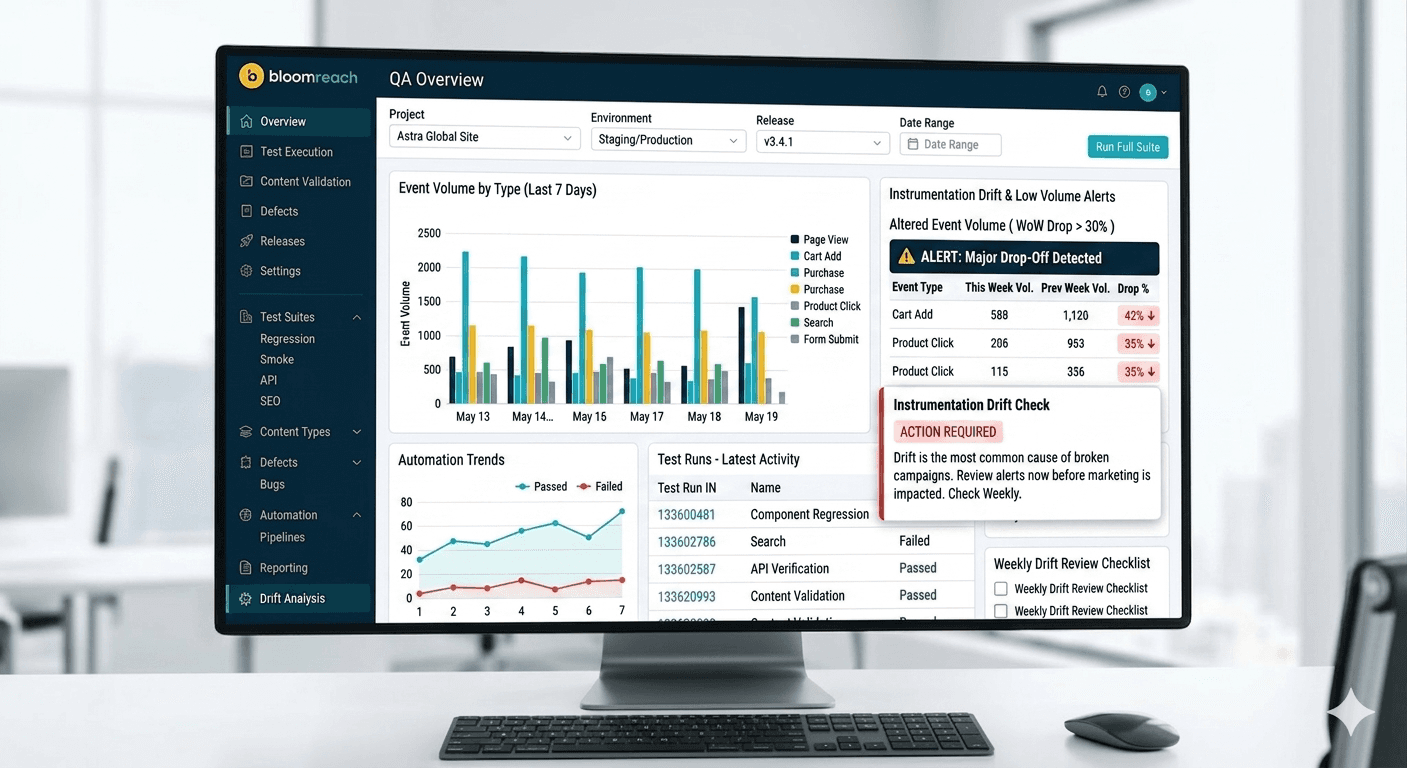
Scalero builds a standing QA dashboard in every Bloomreach implementation: a single view showing event volume by type over the last 7 days, alongside alerts for events whose volume drops by more than 30% week-over-week. Instrumentation drift is the most common cause of broken campaigns, and a dashboard you check weekly catches it before marketing does.
With the data architecture in place, the next question is what to do with it. Part 3 covers the orchestration layer.